Cardona Pipeline Tools / Development whitepaper / October 7, 2026
Greenshot export, made explicit
Export profiles, per-save review, resolution controls, and reliable preview upgrades
Jason Cardona / CardonaLab
Unofficial Greenshot development preview. 595 focused tests passed; latest interactive acceptance pending. Not a released or endorsed Greenshot product.
01
The workflow problem
A small setting with downstream consequences
A screenshot can have the right pixels and still carry an unexpected resolution tag. Moving that file into a print-oriented or Photoshop workflow can introduce extra sizing decisions. The goal is to make those decisions explicit at export, not to change a capture silently.
Separate three decisions
Pixel dimensions describe the image grid. Resolution metadata describes a nominal physical size. Compression describes how the grid is encoded. Changing one should not quietly change the others. This project adds export controls to an unofficial Greenshot development build, under Cardona Pipeline Tools.
What is implemented
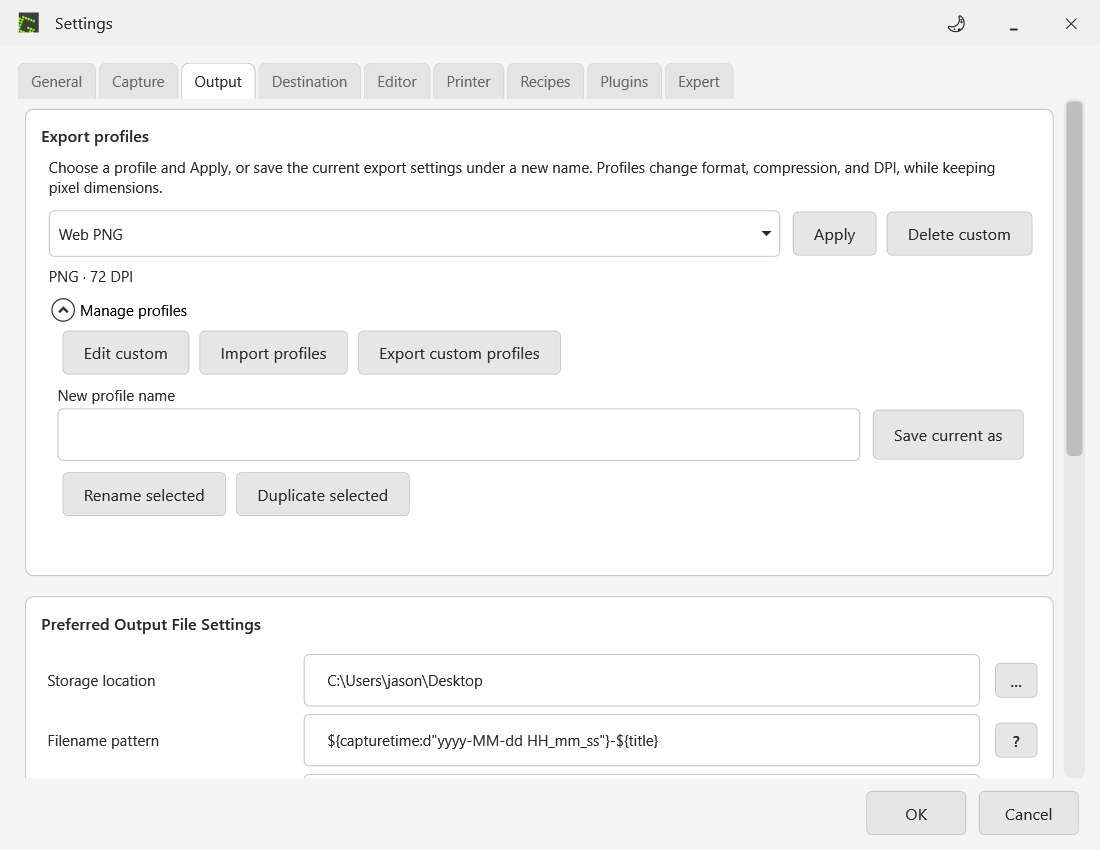
PNG and JPEG offer Preserve, Web 72, Print 300, and validated Custom resolution. Quick Preferences shares the same setting. Still-image WebP offers explicit lossy and lossless modes. Output settings adds explicit Apply for Web PNG, Print JPEG, Lossless WebP, and up to 20 saved custom export profiles. Profiles change export preferences without resizing pixels. The resize dialog accepts pixels, percentages, inches, and centimeters with explicit DPI and upscaling acknowledgment. A saved UI size preference enlarges application controls separately from image zoom.
What this paper does not claim
This is a development-preview whitepaper, not a production release announcement. The installed application has not been replaced. Interactive acceptance of the latest copied preview is still pending. Source is published in the jasonCGI/greenshot fork. No official Greenshot endorsement or upstream acceptance is implied.
02
Pixels first. Metadata second.
DPI is a familiar label; PPI is the image measurement
The interface uses DPI. For raster image resolution, pixels per inch (PPI) is the more precise term; printer dots per inch is different. Display density and Windows interface scaling are separate again. An export resolution tag cannot repair a mixed-monitor capture-coordinate problem. [1, 2]
The same image, three nominal print sizes
For a 1200 by 800 pixel image, physical inches equal pixels divided by PPI. At 72 PPI the nominal size is 16.67 by 11.11 inches; at 96 PPI it is 12.50 by 8.33 inches; at 300 PPI it is 4.00 by 2.67 inches. None of those metadata-only assignments creates detail or removes pixels. [1]
Why offer Web 72?
72 is a preferred handoff convention for this workflow, not a browser requirement. For web work, size the image in pixels and control its displayed size in layout. A 96 PPI file is not inherently unsuitable for the web. The current development default remains Preserve; making Web 72 the default is a future decision. [1]
The Photoshop resampling trap
With Resample disabled, changing resolution preserves pixel dimensions. With resampling enabled and physical size retained, changing a 1200 by 800 image from 96 to 72 PPI yields 900 by 600 pixels. This is a calculated example, not a measured application defect. Metadata-only export retains 1200 by 800. [2]
Opening is not placing
Placing a file in an existing Photoshop document can involve fitting and transforms. Check the placed layer dimensions before attributing a size difference to its resolution tag. A specific 72-versus-96 placement issue still needs reproduction in the actual document and Photoshop version. [3]
| PPI | Nominal inches |
|---|---|
| 72 | 16.67 by 11.11 |
| 96 | 12.50 by 8.33 |
| 300 | 4.00 by 2.67 |
03
An export contract users can see
Preserve, presets, and Custom
Preserve keeps the source resolution, including different horizontal and vertical values. Web writes 72 and Print writes 300 without resizing. Custom accepts a whole number from 1 to 2400. Entering 72 as Custom remains a deliberate Custom choice, not a silent switch to the Web preset.
One setting, several entry points
Output Preferences and Quick Preferences use a shared export-resolution setting. The quality dialog can select a resolution for a save when enabled. Quick Preferences refreshes its selection when opened and respects fixed settings. Cancelling its Custom prompt leaves the choice unchanged. Quality-dialog Cancel keeps settings unchanged; Main Preferences Cancel does not roll back valid live edits.
Safe ownership of image data
The output path can borrow a source image, and color reduction can replace an export bitmap. Applying resolution to the wrong object could alter later operations or lose the intended tag. The implementation keeps source data unchanged and applies metadata to the final PNG/JPEG export image.
Save from the capture picker
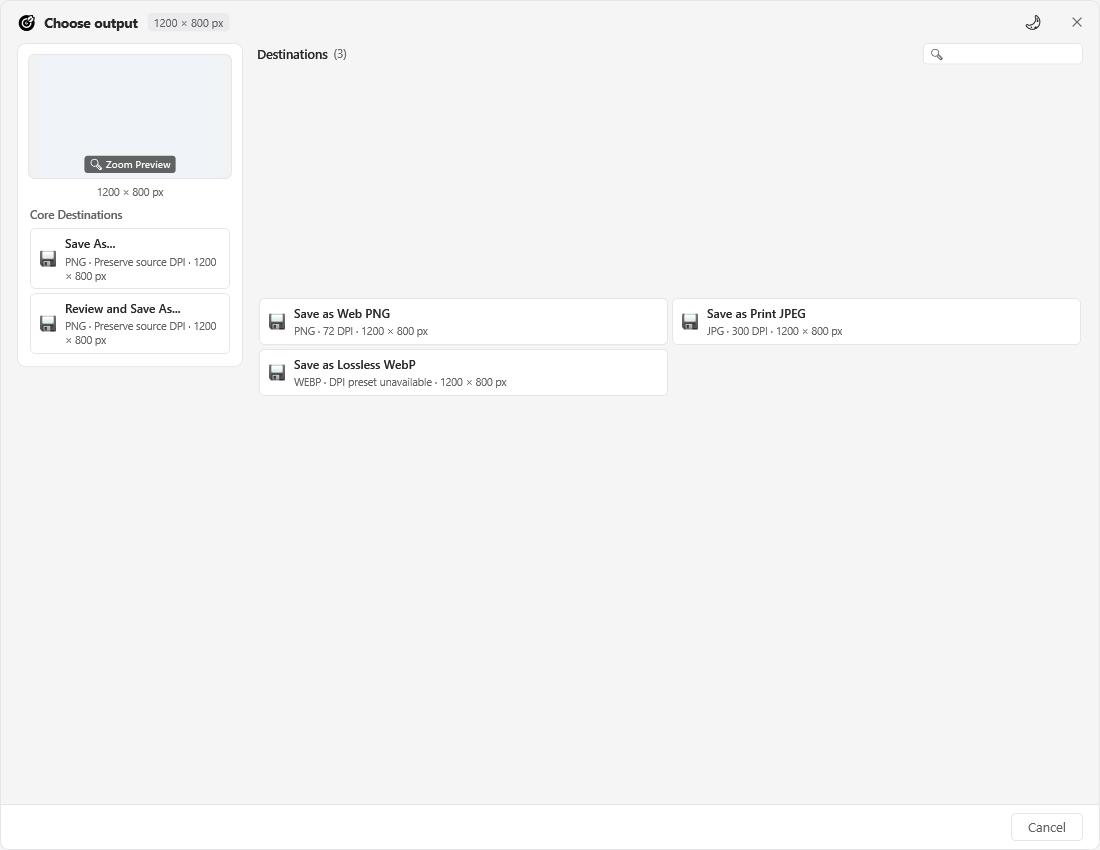
Built-in and custom profile choices apply to one save without changing defaults. Save As preselects the profile format, which can still change. Fixed policies hide profile choices. Picker and editor Save As labels show format, DPI preset, and image pixels; the final format and quality prompt control the export.
A live export summary
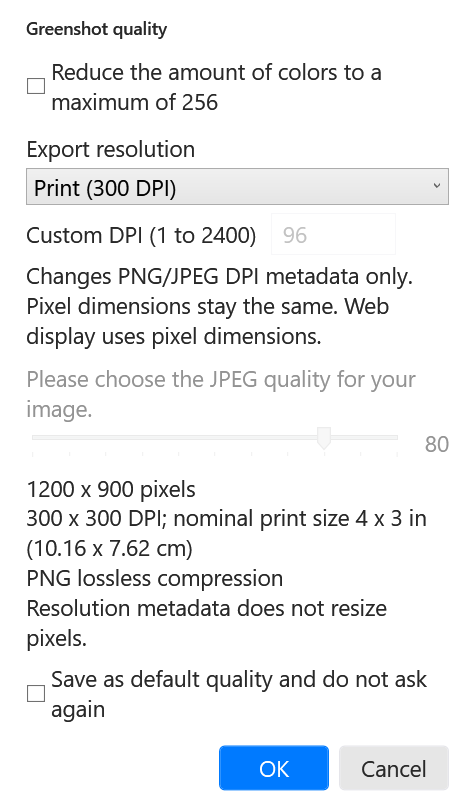
The quality dialog shows the rendered pixel dimensions, selected PNG/JPEG resolution, nominal inches and centimeters, and compression. Changes update the summary before confirmation without committing settings. WebP identifies its compression mode and states that the DPI presets do not apply. The summary appears when the quality prompt is enabled.
Keep resizing explicit
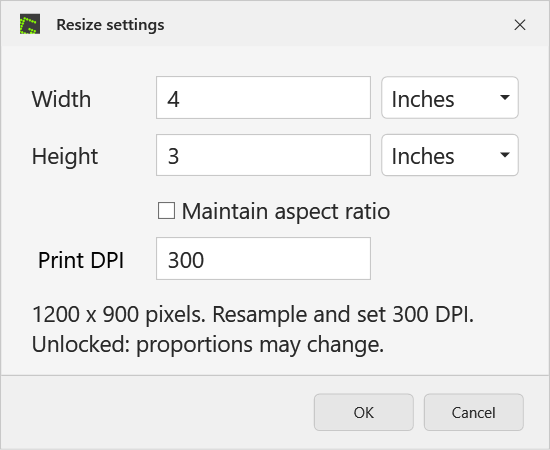
Pixels and percentages use consistent integer rounding. Locked resize fits both bounds and can leave one unfilled; unlocked resize uses exact dimensions and can change proportions. Inches or centimeters use a whole-number DPI from 1 to 2400. Unlocked 4 by 3 inches at 300 DPI produces 1200 by 900 pixels and sets 300 DPI on the resized image. Enlarging requires Allow upscaling acknowledgment and adds no detail. Later export presets can override that resolution.
Validate before allocating
Resize validation limits each axis to 32767 pixels and total area to 100 million pixels. Invalid input disables confirmation with an explanation. Results that round below one pixel are rejected, not silently clamped. Bicubic sampling remains unchanged.
04
WebP: choose the loss, not a label
Both modes are compressed
Lossy and lossless are the correct choices. Lossless is not an uncompressed WebP format. WebP supports both forms of compression and transparency; this project adds still-image export only. It does not promise animation or color-profile preservation. [4]
Lossy: a deliberate quality tradeoff
The preview exposes a quality value from 0 to 100, independent of JPEG quality. Tests verify the output route and exact alpha behavior, not identical lossy RGB pixels. A quality value is not a universal visual-quality score or a guaranteed file-size reduction.
Lossless: preserve the rendered grid
The implemented lossless route preserves rendered RGBA values, including RGB hidden under transparency. It ignores the inactive lossy quality setting and bypasses palette reduction. Exact pixel preservation is tested for the generated cases; arbitrary real-world artwork still needs review.
Resolution scope stays narrow
The PNG/JPEG resolution presets are not applied to WebP. Selecting a WebP export does not imply density, profile, or animation metadata preservation. GIF, BMP, TIFF, and Greenshot project files are also outside the new DPI preset contract.
Reject invalid export requests early
Invalid WebP quality and oversized final output are checked before creating or truncating the main or temporary output file. Validation uses the image size after effects. Focused regressions check rejection, unchanged source data, and isolated temporary-file behavior.
No invented compression benchmark
This paper reports no project-wide percentage saving or performance gain. File size depends on content and settings. A publishable comparison should use a fixed screenshot corpus, record dimensions and encoder settings, and review text, edges, gradients, and transparency.
05
Size the interface, keep the pixels
A preference inside Greenshot
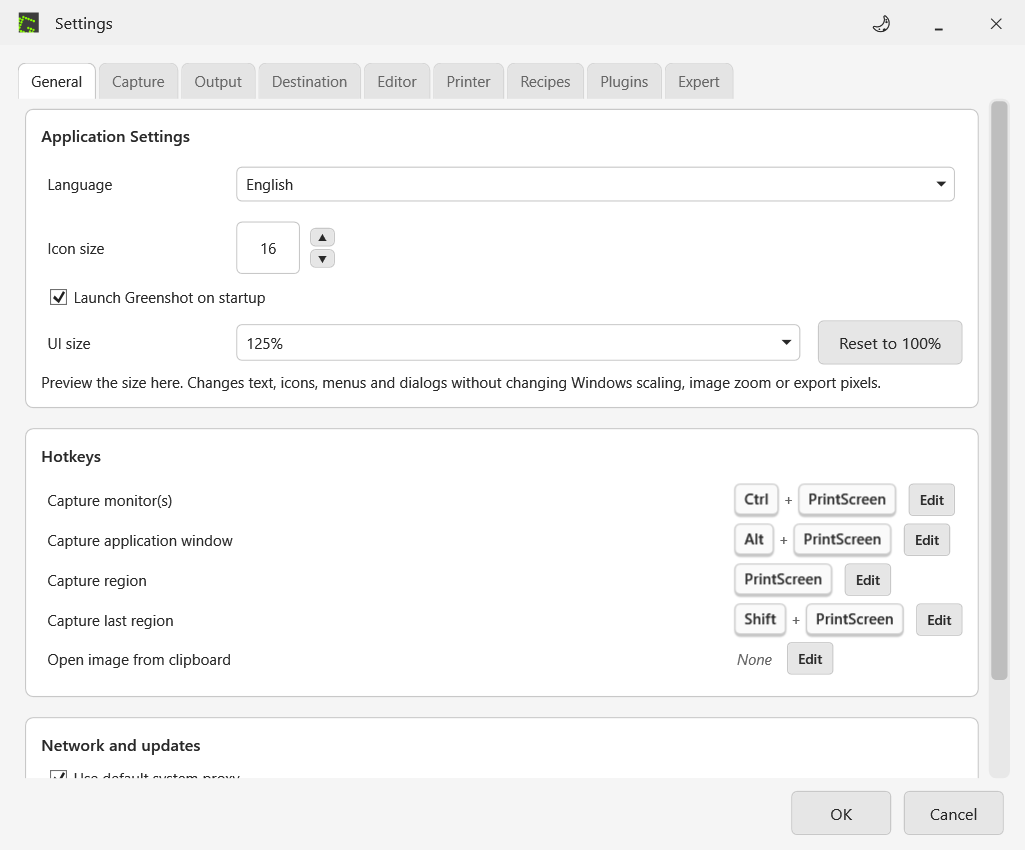
Preferences, General, UI size offers 100%, 125%, 150%, and 200%, with a Reset to 100% button. The setting applies live to open application controls and persists through the normal preference save. Fixed policy settings remain authoritative.
Separate UI size from image zoom
This is an application magnification preference; it does not change Windows scaling. WinForms menus and toolbars grow while the editor canvas retains its image dimensions, pixels, resolution tags, and zoom. WPF dialogs scale their layout and text together.
Fit the available screen
Scaled dialogs use a stable scrolling container and are bounded by the current monitor working area. When the full layout cannot fit, scrolling keeps controls reachable. Repeated size changes use the original layout baseline rather than multiplying a previously scaled size.
Verified behavior and remaining checks
The focused suite tests saved sizes, invalid-value fallback, live updates, reset, unchanged image data and zoom, and the real Preferences selection. Offscreen renders cover all four UI sizes. Preferences, export-summary, and physical-resize offscreen renders cover all four sizes. Auto-height dialogs constrain their logical width so scaled text wraps. Native keyboard, popup, toolbar overflow, small-screen interaction, and mixed-monitor behavior still need supervised acceptance.
06
Evidence, limits, and the next gate
Executed: 595 focused tests passed
The authoritative fresh build and focused test run completed October 7, 2026 after the four-sprint profile, review, launcher, and workflow changes: 595 passed, zero failures, errors, timeouts, or aborted tests. This is a selected regression suite, not the complete upstream test suite. [5]
Build conditions matter
Fresh source assemblies and the test host were built without dependency restore, using cached prerequisites. A code self-review covered profiles, policy, storage, UI bindings, launcher migration, and packaging; identified issues were fixed. The normal restore graph previously failed when the package feed was unreachable and was not retested. Existing upstream analyzer warnings remain; a passing focused run is not a clean-build certification.
Copied-preview evidence remains format-specific
The refreshed copied-library verifier passed ten PNG/JPEG exports at 1200 by 800. It checked density metadata, unchanged source, equal PNG pixel buffers, and copied assembly provenance. It does not compare JPEG pixels or exercise WebP and UI interaction. Those features have focused tests and still need native manual acceptance.
Capture and launch choices
English labels distinguish application windows from monitors without changing capture geometry. Relaunching the same preview opens Preferences through the existing settings command. A different running installation requires normal Exit. Native repeat-launch acceptance is pending.
Pending: the human workflow
The isolated copied package is prepared separately from the installed application. Native app control is unavailable in the current session, so the manual gate remains open. The release includes an acceptance checklist. Next exercise Quick Preferences, Custom cancel, WebP Save As, overwrite behavior, keyboard use, UI sizes from 100% through 200%, layout at different Windows scales, and Photoshop placement. Mixed-monitor capture and non-English labels need separate checks.
Promotion is a decision, not a timer
Keep Preserve as the current default. Consider Web 72 later with a deliberate preference decision and migration review. An unsigned lightweight prerelease includes an isolated launcher, checksums, exact source provenance, and dependency notices. Finish native acceptance and an independent clean build before stable promotion. Source, review notes, and documentation are public.
Project provenance
Public fork: github.com/jasonCGI/greenshot, branch codex/export-dpi-presets. The release manifest records the exact source commit. Upstream: greenshot/greenshot, base 118d1c1a11ee7b434a8235ee1d80482e0020a8a8. Verification remains local project evidence, not an independently reproduced certification. [5, 6]
| Group | Passed |
|---|---|
| Export DPI and summary source | 203 |
| Resize image | 57 |
| Resize dialog and physical size | 77 |
| WebP backend | 63 |
| WebP UI | 21 |
| Quick DPI | 34 |
| Format registry | 11 |
| User interaction | 56 |
| Settings | 8 |
| Stream save | 2 |
| Dialog smoke | 1 |
| UI size and format discovery | 20 |
| Export summary | 5 |
| Export profiles and Output UI | 31 |
| Export workflow acceptance | 6 |
07
Profiles and reliable upgrades
Edit a saved profile without changing defaults
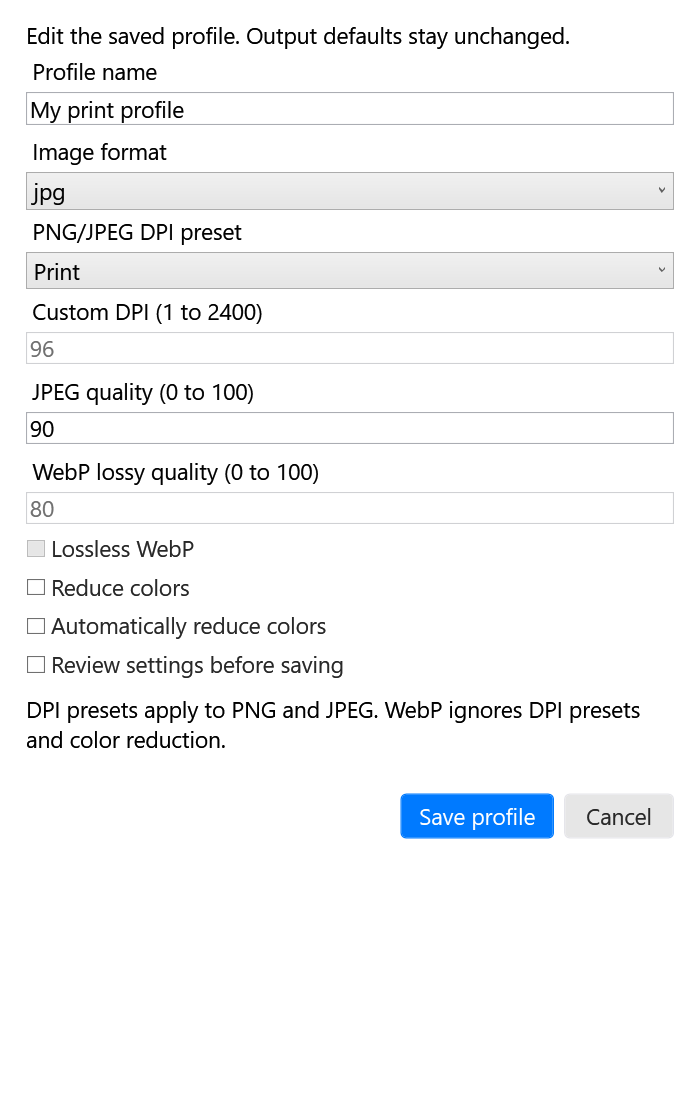
Manage profiles offers a separate custom-profile editor, rename, and duplication of built-ins. The summary exposes format, DPI, and compression. Saving an edit changes the stored profile only; Apply explicitly changes output defaults. Inactive format controls are disabled.
Move profiles as a complete transaction
Portable XML includes custom export profiles, without paths or capture settings. Import validates names, numeric bounds, storage size, and the combined 20-profile limit before committing anything. Duplicate or reserved names reject the complete import; existing profiles stay intact. XML external entities are prohibited.
Review the actual save
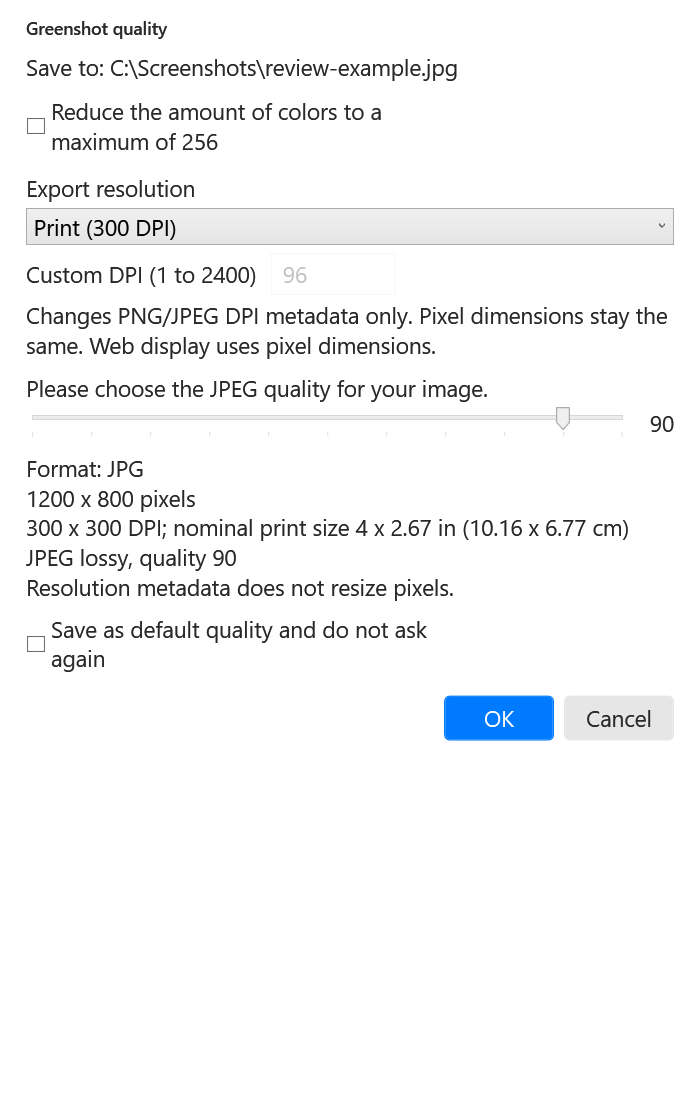
Review and Save As is a per-save option even when automatic quality prompts are off. After filename and format selection, it shows the target, final format, rendered pixels, supported DPI, nominal print size, and compression. Cancellation preserves an existing file. An explicit remember-defaults choice can still update defaults.
Use one launcher across preview versions
The installer verifies package hashes before updating a stable pointer and keeps the previous pointer. After normal Exit, the first stable launch backs up and migrates the old saved preferences. Later previews reuse shared settings and logs without overwriting those preferences. A different running preview is blocked; nothing is force-stopped.
Small local diagnostics
The report lists source/version, process presence and response, and settings/log folder existence. It excludes log contents, preferences, screenshots, and window titles, and uploads nothing. Twelve simulated launcher checks passed, including migration, preservation, process guard, repeat-launch request, and rejection of corrupt packages. These checks do not prove native tray behavior.
A cache correction found during review
Automatic color reduction now participates in the export cache key. Different profile settings cannot accidentally reuse the same rendered/encoded output. A real export-source regression covers both variants and repeated reuse. Native keyboard, overwrite-dialog, repeat-launch, mixed-monitor, and Photoshop acceptance remains pending.
08
Settings screenshots
These images render the actual WPF application controls offscreen. Preferences, profile editor, and review figures use 125% UI size; the capture picker uses its default size. They are not design mockups or native desktop captures, and they do not establish manual acceptance. Click an image for its full-size PNG.
Independent profile editing
Review the final save
One-save profiles and visible DPI
Output format and reusable profiles
UI size and capture labels
Resolution and export summary
Physical-size resizing
References and evidence
- Adobe: Change the image size
- Adobe: Cropping, resizing, and resampling
- Adobe: Place files in Photoshop
- Google: An image format for the Web
- Local project record: source-audit.json and sprints-1-4-verified-20261007.trx. Build and acceptance notes distinguish executed checks from pending work. These records are not published as downloads.
- Public development fork and illustrated settings guide
External references reviewed October 4, 2026. Calculated examples are explanatory, not measured Photoshop results. Greenshot is an upstream open-source project; this paper describes unofficial local changes.